Structured Workouts on Garmin: Two-Way AI Watch Coaching
How to send adaptive run, ride, swim and strength intervals straight to your Garmin watch, sync completed sessions back, and avoid broken AI interval maths.
On this page (5 sections)
A sports watch is unbeatable at two jobs: guiding you through a structured session step by step on your wrist, and recording every split, heart rate beat, and pool length while you move. Where a watch struggles on its own is managing the bigger picture across months when a busy week at work, a heavy lower-body gym day, or a Saturday match means Thursday’s threshold run needs to change.
With our two-way Pelaris for Garmin integration, you do not have to choose between your watch and an adaptive coach, and you never have to sit in Garmin Connect’s workout builder manually clicking through repeat blocks on a Sunday night.
Here is how the two-way connection works, how to set up your pace and heart rate zones so your watch stops buzzing at the wrong times, and why multi-step intervals are one of the hardest things for an AI coach to get right.
What two-way Garmin Connect sync actually does
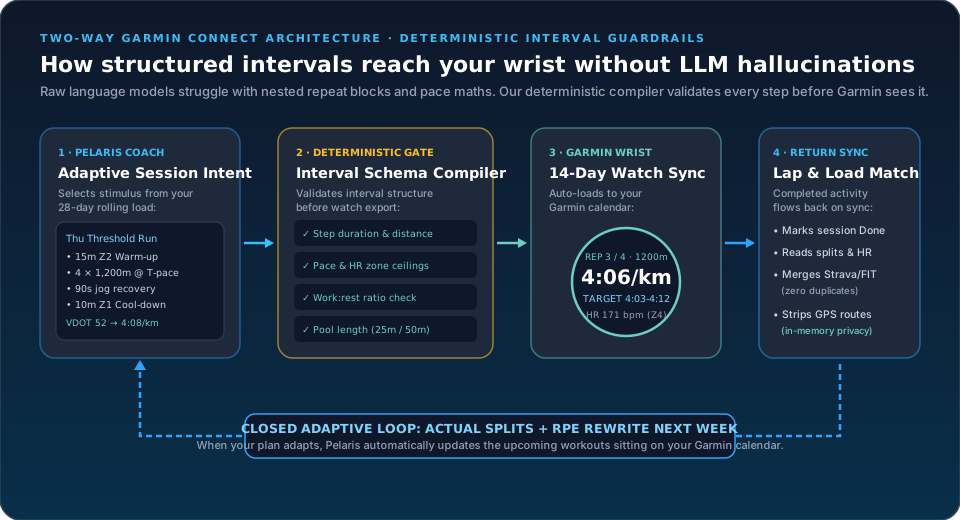
Most training apps only talk to Garmin in one direction: they wait until you finish a run, pull the summary over the API, and tick a box. Connecting Garmin Connect to Pelaris links the two in both directions on every plan, including the free Beach tier:
- Outbound: 14 days of structured workouts on your wrist. Turn on Send planned workouts to my watch (during initial setup, inside Profile > Connected Apps, or by tapping Send to watch on any session card), and Pelaris pushes the next two weeks of your planned run, ride, pool swim, strength, cardio, yoga, and pilates sessions to your Garmin Connect calendar.
- Dynamic calendar updates when your plan adapts. As we covered in adaptive plans vs fixed periodization, real life rarely follows a 16-week script. If you log a high RPE on Tuesday or tell your coach you need to dial Thursday back, Pelaris automatically updates the structured workout on Garmin Connect so the session on your wrist matches your adjusted plan.
- Inbound: Completed sessions mark your plan done. As soon as you save a workout on your watch, it flows back into Pelaris with your duration, distance, heart rate, pace, elevation, lap splits, and device name (such as Garmin Forerunner 965 or Fēnix 8). Matching planned sessions mark complete automatically; if you went rogue and turned a 3 km swim into a run-swim-run brick (see why AI coaches struggle with fatigue), Pelaris logs the real work and adapts your upcoming load around it.
- Zero duplicates with Strava or historical FIT files. If you also connect Strava or bring your historical watch files across, Pelaris checks every incoming file against your timeline, merges matching sessions into a single entry, and never stores your GPS route map.
Why multi-step intervals are so hard for AI (and how we fixed it)
As I mentioned in our piece on readiness, AI does not replace a human coach, and trusting raw language model output blindly causes problems fast. The clearest example our team ran into while building Pelaris was intervals.
Ask an unguarded large language model to write a 60-minute threshold session with a warm-up, nested repeat blocks (4 × 1,200m with 90-second recoveries), strides, and a cool-down, and it writes prose that sounds convincing. Then you parse the steps for a Garmin watch and discover:
- Broken step totals: Step durations add up to 43 minutes instead of the 60 minutes promised in the summary.
- Impossible pool lengths: A pool swim interval specifies a 175-metre rep in a 50-metre pool, leaving you stranded in the middle of the lane.
- Unrunnable pace alerts: The target pace for a 3-minute VO2max interval is set slower than threshold pace, or set as a single rigid figure (4:05/km) instead of a corridor (4:00 to 4:10/km) so the watch buzzes every ten seconds.
“Multi-step interval arithmetic is notoriously tricky for raw language models. That is why our team at Pelaris built a deterministic interval compiler between the AI coach and Garmin Connect—so you never get stranded halfway down a 50-metre pool or buzzed every ten seconds on a run.”
Physiologically, exact interval structure matters. In Jack Daniels’ VDOT framework, Threshold (T) intervals require controlled paces around 88 to 92 per cent of maximal heart rate with short recoveries, while Interval (I) bouts target 95 to 100 per cent of VO2max with work-to-recovery ratios of 1:1 or less. In team-sport pre-seasons (see our guide to MAS conditioning grids), Dupont and colleagues (2004) showed that 15-second efforts at 120 per cent of MAS rely on strict work-to-rest timing.
In our pipeline, the AI chooses the session intent and methodology; our deterministic compiler verifies step arithmetic, enforces pool-length multiples (25m or 50m), widens pace and heart rate targets into practical wearable corridors, and checks that work-to-rest ratios match the physiological zone before sending the workout to Garmin.
Calibrate your watch zones first: Use the Zone 2 Heart Rate & 5-Zone Endurance Calculator to compare your zones across four sports-science models (Karvonen Heart Rate Reserve, Lactate Threshold HR, Tanaka %HRmax, and MAF) so your watch alerts line up with your actual physiology.
Setting up your zones so your Garmin stops nagging you
As Tanaka, Monahan, and Seals (2001) showed across 18,712 subjects, 208 − (0.7 × age) is a better population equation for maximum heart rate than 220 − age, and individual max heart rate can still sit 10 to 15 beats per minute higher or lower than any age formula. Worse, setting your Zone 2 aerobic ceiling as a flat percentage of maximum heart rate ignores your resting heart rate and lactate threshold.
“If you are a fit runner or swimmer with a resting heart rate of 46 bpm, leaving your watch on the factory 220-minus-age default will buzz at you to slow down when you are barely breathing through your nose.”
Two habits make watch-guided workouts smoother:
- Use pace corridors for short intervals, and Heart Rate Reserve (or LTHR) for easy runs. Heart rate lags behind effort by 45 to 90 seconds at the start of an interval. For reps under three minutes (like 400m or 1km repeats), follow the target pace corridor on your watch. For 45-to-90-minute easy aerobic runs following Stephen Seiler’s 80/20 intensity distribution, use a Karvonen Heart Rate Reserve or Lactate Threshold HR zone so hills and heat are accounted for.
- Pair live sync with your historical FIT archive. To give your coach your previous years of training blocks right away alongside live sync, follow our guide to importing FIT files into Pelaris.
How to connect your Garmin in under a minute
- Sign in to Pelaris: Open coach.pelaris.io on the web or launch the iOS or Android app.
- Open Connect & Sync: Under Profile > Connected Apps, tap Connect on the Garmin card.
- Enable workout push: Tick Also send my planned workouts to Garmin Connect to load your next two weeks of structured workouts onto your watch calendar automatically.
- Confirm on Garmin: Approve the connection on Garmin Connect.
What this means for your training
- Let the watch handle the splits, and the coach handle the block. Use your Garmin on the road, track, or pool deck while letting an adaptive plan adjust next week’s sessions when life or fatigue shifts.
- Check your Zone 2 ceiling against Heart Rate Reserve or LTHR. Run your numbers through the Zone 2 calculator so your easy runs stay honest without constant watch alerts.
- Use pace for short reps and heart rate for steady volume. Because cardiac output lags a sudden surge in speed, pace corridors are much more reliable on intervals shorter than three minutes.
- Bring your past blocks across once. Link Pelaris for Garmin for automatic two-way sync going forward, and drop in a one-time historical FIT export so your coach knows your multi-year baseline from day one.
136 – 150 bpm
Consensus LT1 band
192 mins/wk
Zone 1–2 aerobic base
48 mins/wk
Threshold & VO2max
| Physiological Model | Zone 2 Range [EST] | Why It Differs |
|---|---|---|
| Karvonen Heart Rate Reserve (60–70% HRR) | 133 – 146 bpm | Accounts for your resting heart rate reserve |
| Lactate Threshold 80/20 (81–89% LTHR) | 139 – 153 bpm | Anchored to your 20-30 min threshold effort |
| Standard %HRmax (65–75% Max HR) | 121 – 140 bpm | Default watch formula (often underestimates fit athletes) |
| Maffetone MAF (180 − Age) | 138 – 148 bpm | Maffetone’s conservative rule of thumb |
Heart rate zones are estimates. If you have a heart condition or take medication that affects heart rate, ask your doctor which numbers suit you.
The link carries the numbers you entered in the part of the address after the #, which is never sent to a server. Share it only with people you are happy to show those numbers to.
About these numbers: Formula, guard-rails & 3 peer-reviewed citations ▾
Karvonen Z2 = RHR + 0.60–0.70 × (HRmax − RHR) · LTHR Z2 = 0.81–0.89 × LTHR · Tanaka HRmax = 208 − 0.7 × Age
Fixed percentage-of-max zones can sit well away from where your first ventilatory threshold actually is, especially for very fit athletes with low resting heart rates. Anchoring to heart rate reserve or lactate threshold heart rate often lines up better with the talk test. These are estimates: if you have a heart condition or take medication that affects heart rate, ask your doctor which numbers suit you.
- • When a lab or field max heart rate is unavailable, the regression 208 minus 0.7 times age gives a better group-level estimate for healthy adults than the older 220 minus age rule. Individuals can sit well away from it. [Source]
- • Successful endurance athletes in this review spent roughly 80 per cent of their sessions at low intensity (below the first lactate threshold) and about 20 per cent at high intensity, a pattern many coaches use as a sensible default. [Source]
- • Your VO2max estimate from a hard run comes straight from Daniels' VDOT tables, the pace-to-fitness model coaches have trusted for over forty years. [Source]
General fitness and training estimates only, labelled EST. Not medical advice or a clinical diagnosis.