technology · general
Open Water and Moonshot: how we rebuilt program generation from scratch
This is the biggest update we’ve shipped. Two projects, months of work, one goal: make the path from “I want to train” to “here’s your first session” feel like sitting down with a real coach.
Open Water is the intake and onboarding overhaul. The name came from the project’s ambition: take users out of the safe, controlled lane pool of a structured form and into open water, where the experience adapts to them instead of forcing them through a fixed course. Fewer steps, smarter questions, a coach that responds to what you tell it.
Moonshot is the generation engine rebuild. We ran our existing 5-layer pipeline head-to-head against a single “one-shot” attempt from Gemini and Claude. The single call won. Our carefully orchestrated multi-stage system was being outperformed by one well-prompted shot. So we scrapped the pipeline and went for the moonshot: one streaming call, every tool at its disposal, the AI coaching in real time while it builds your program.
Here’s what changed and why.
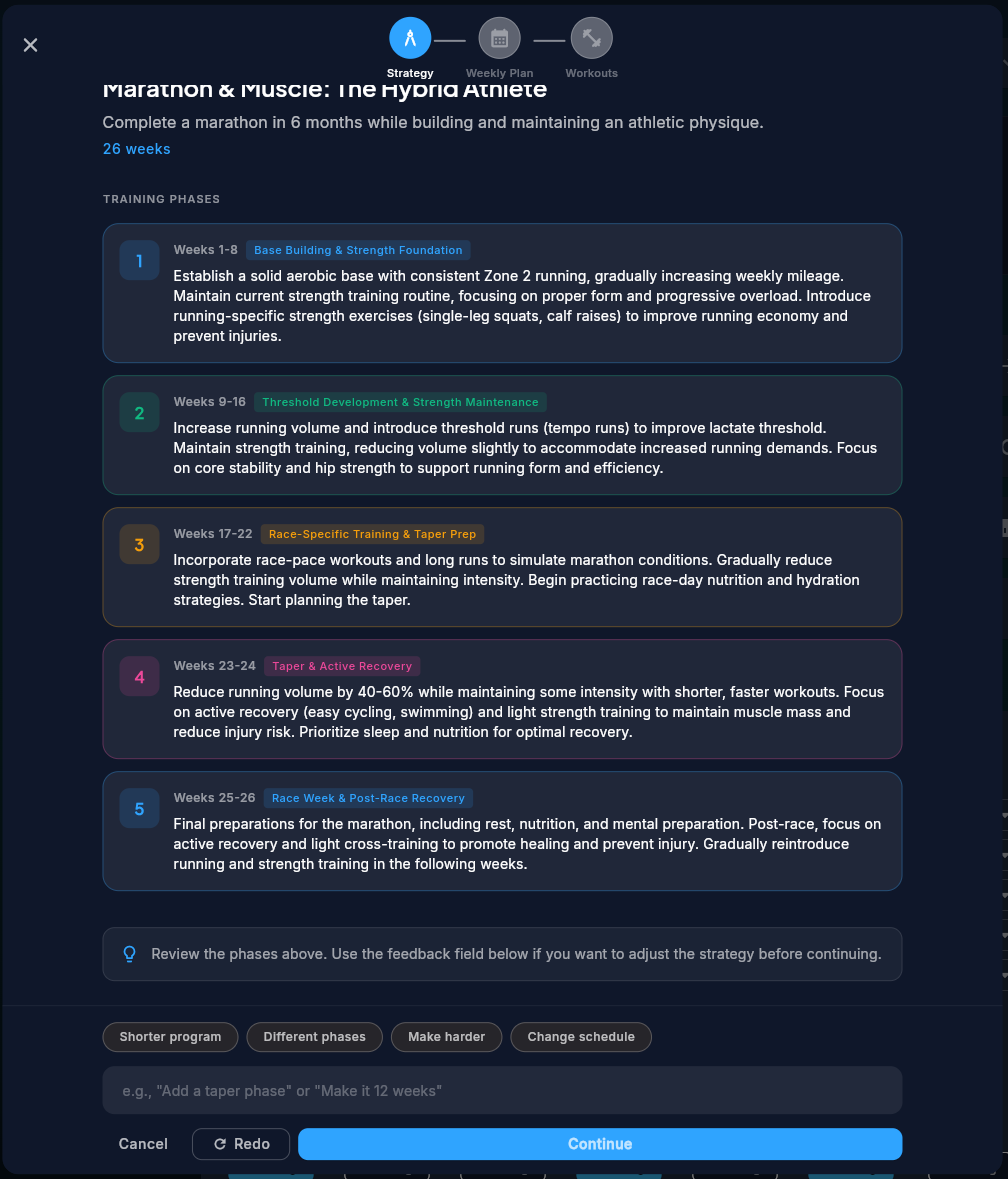 Before: The old 3-stage pipeline. Strategy, overviews, then sessions, each behind a separate loading screen.
The intake was the bottleneck
Our data told a clear story. Half the people who started intake didn’t finish it. Nine steps, most of them mandatory, all of them feeling like a medical questionnaire. The people who did finish waited through three separate generation stages, each with its own loading screen, before seeing a single session.
We were losing people to admin before they ever got to train.
Open Water restructured intake from 9 steps to 5, with two of those conditional. If the AI doesn’t need to clarify anything, the review step disappears. If you don’t want body analysis right now, skip it. The first screen gives you two options: tell your training story, or just start tracking and come back later.
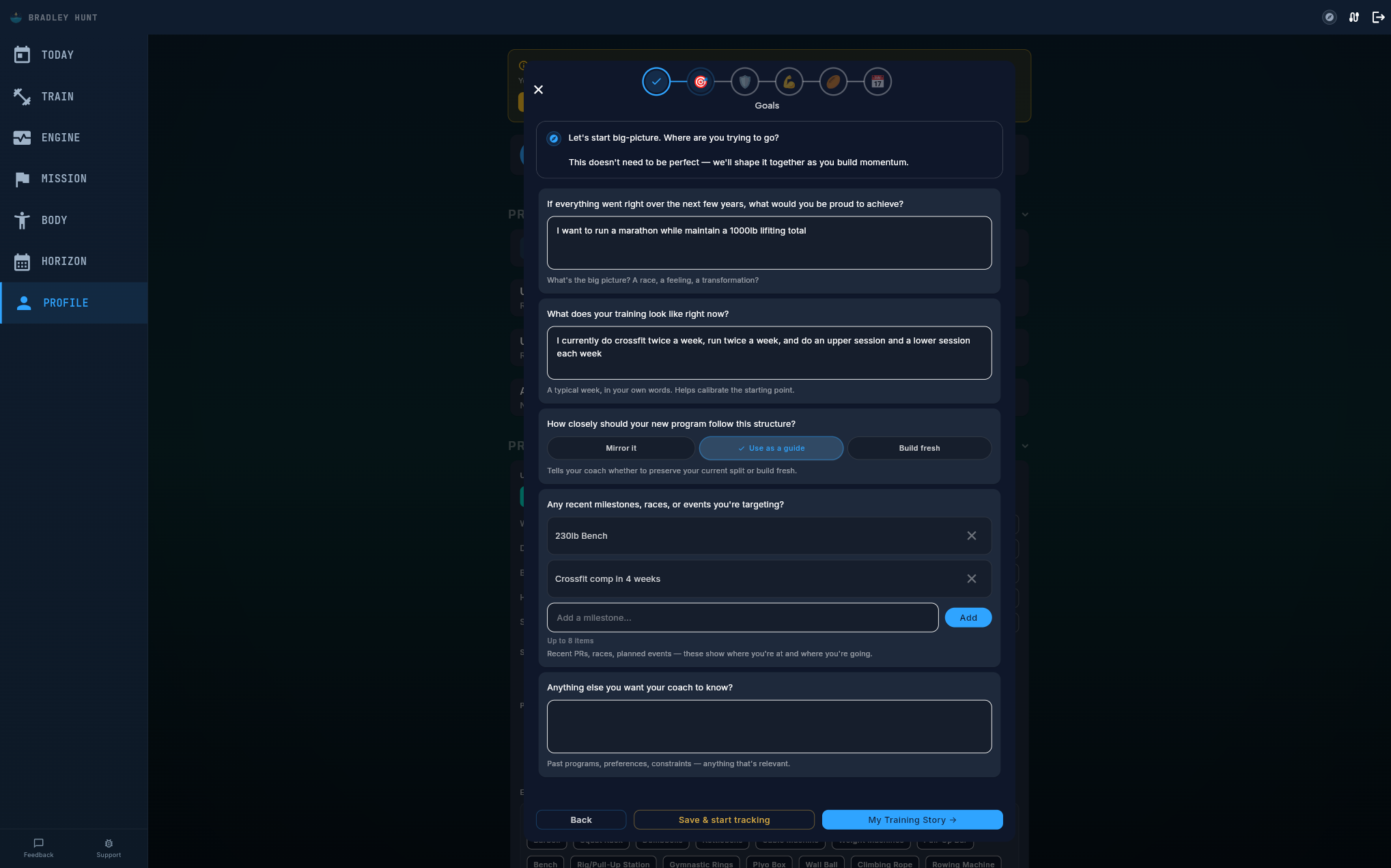 The new goals step. Tell your coach what you’re trying to achieve in your own words. The AI extracts structure from natural language.
Every step now has three actions at the bottom: go back, save and start tracking, or continue. You can leave at any point, and your draft is preserved for seven days. When you come back, a tile on your Today view shows exactly where you left off.
Existing users upgrading from our previous intake version keep all their answers. Nothing lost.
Coach moments between the questions
The intake used to feel like a form because it was one. Questions, answers, next button, repeat.
Now, between each phase, a coach moment appears. Fullscreen acknowledgements, personalised to what you just entered, confirming the AI understood your input before moving on. Auto-advance after a few seconds, or tap through.
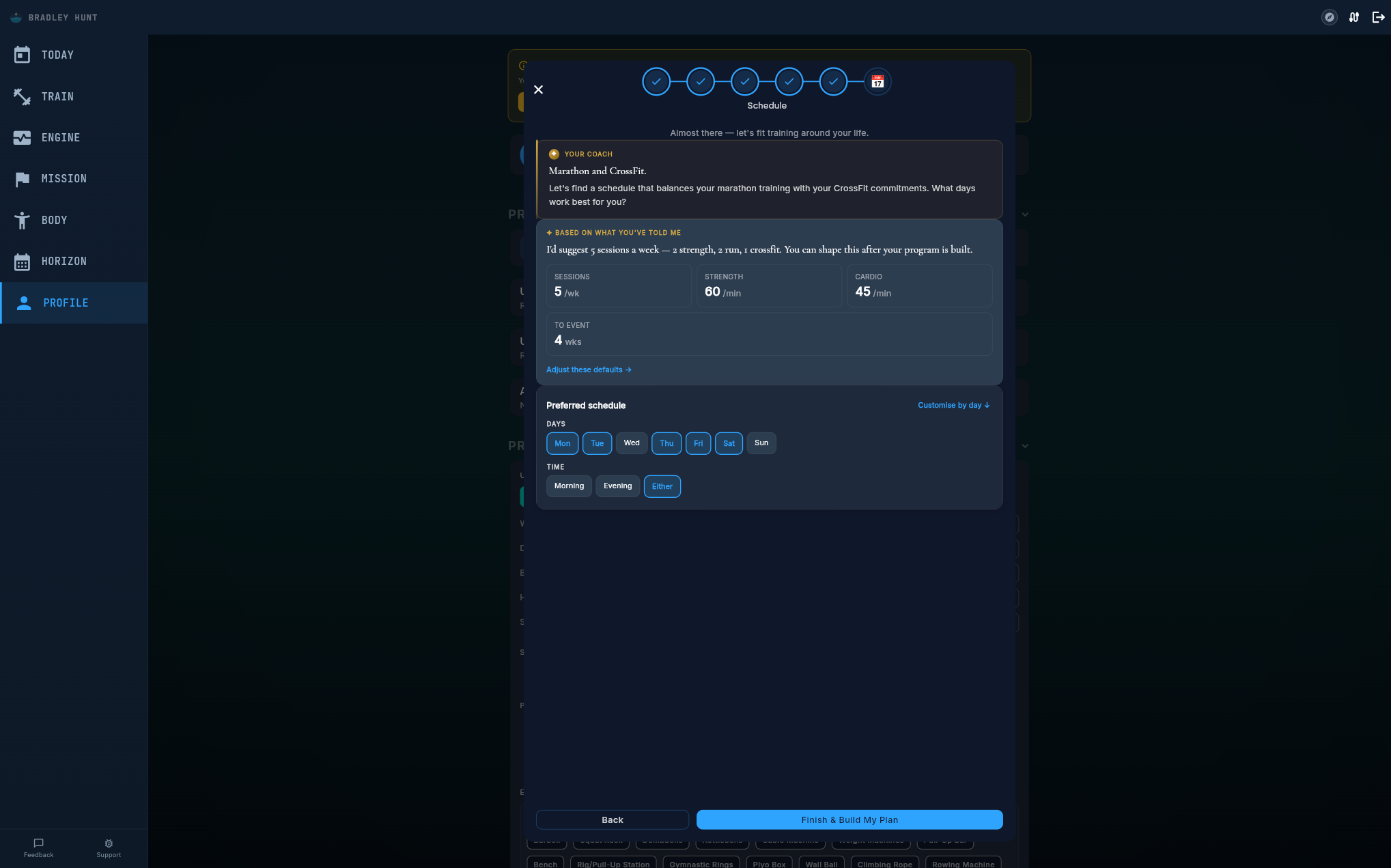 Schedule step. The AI suggests a frequency based on your goals and current training, then you fine-tune days and times.
A small change that transforms the feel. You’re talking to your coach, and the coach is actually listening.
Equipment selection now groups gear by category. Strength athletes see barbells and racks. Swimmers see pool equipment. Runners see GPS watches and treadmills. All categories are visible so you can tell your coach exactly what you have access to, regardless of your primary sport.
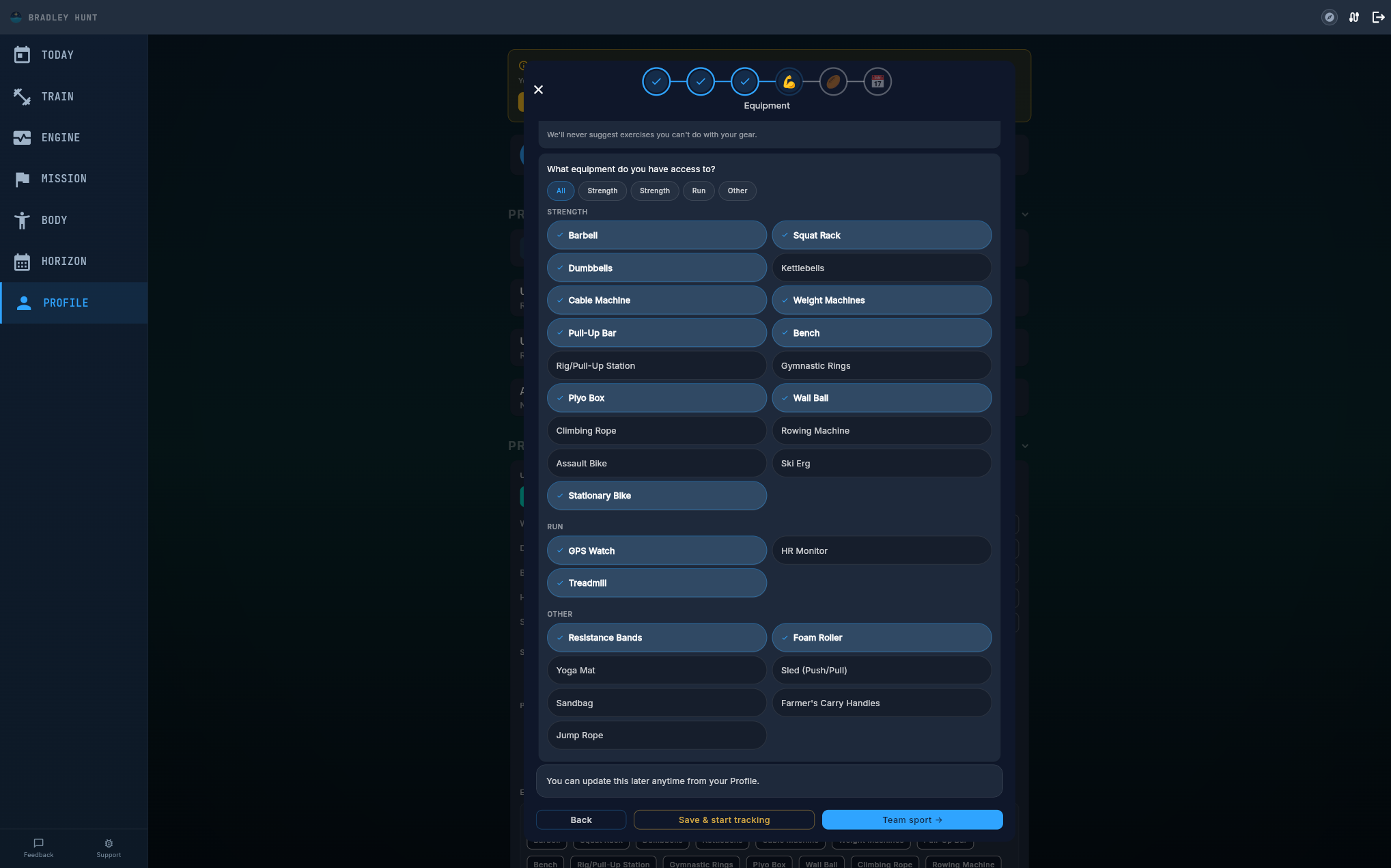 Equipment grouped by category. Select everything you have access to, the AI will never suggest exercises that need gear you don’t own.
Your coach thinks out loud
This is the part that matters most.
The old pipeline called three separate AI stages in sequence, each behind a loading spinner. Strategy, then overviews, then sessions. Each stage took 30-60 seconds. You stared at a progress bar and hoped.
Moonshot replaces all of that with a single streaming call where you watch your coach reason in real time.
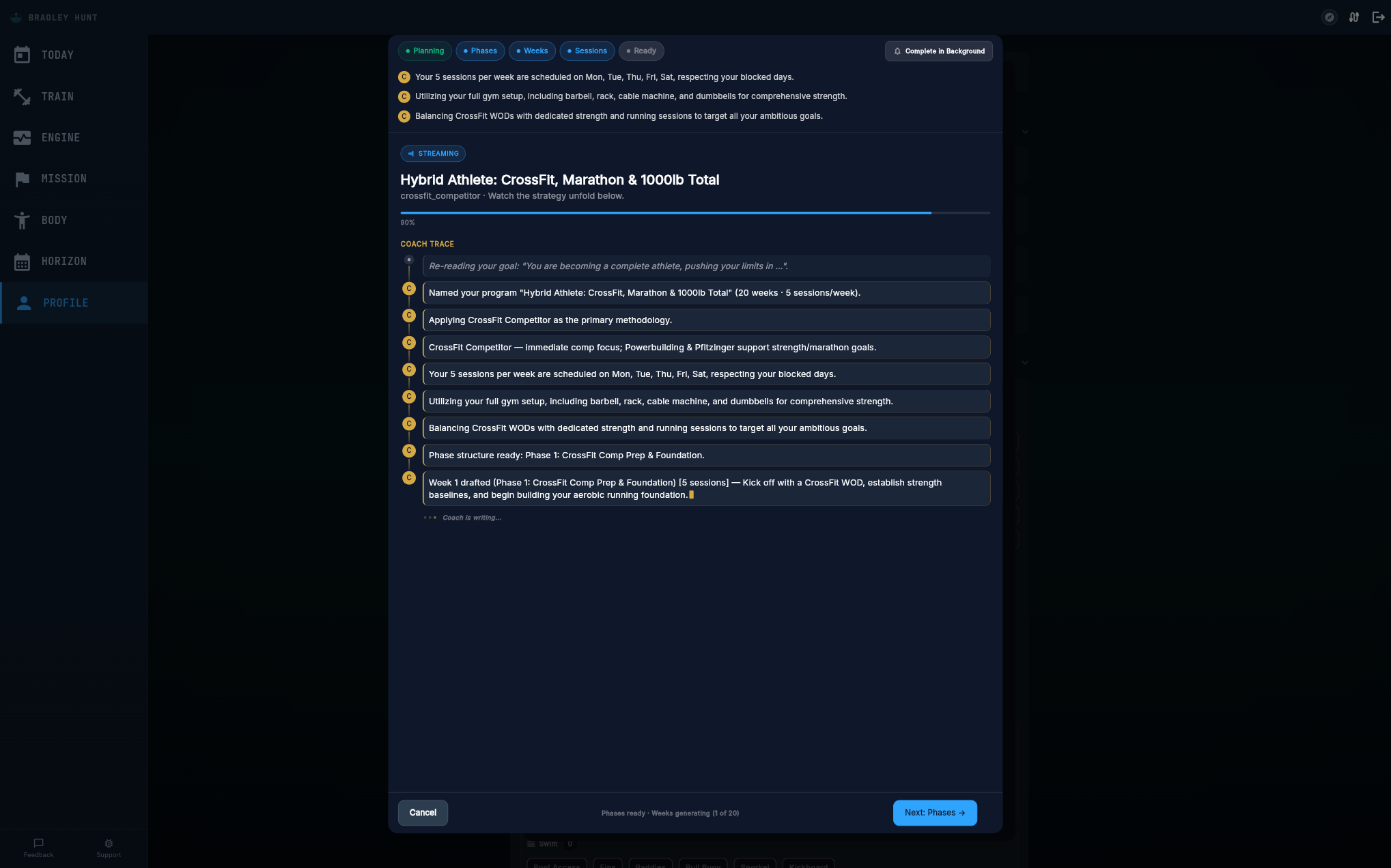 The Planning tab. Your coach thinks out loud, methodology selection, schedule interpretation, equipment constraints, phase structure. Every decision visible as it happens.
When generation starts, a brief warmup moment plays while the AI loads your context. Then the coach trace begins. You see actual reasoning: which methodology was chosen and why, how your schedule was interpreted, what equipment constraints were respected, how your injury history influenced exercise selection.
Program name and methodology appear within seconds, before the full program is even built. The Phases tab unlocks as soon as the AI has decided the macro structure. Phase cards fade in one by one, replacing skeleton placeholders with real content as they’re generated.
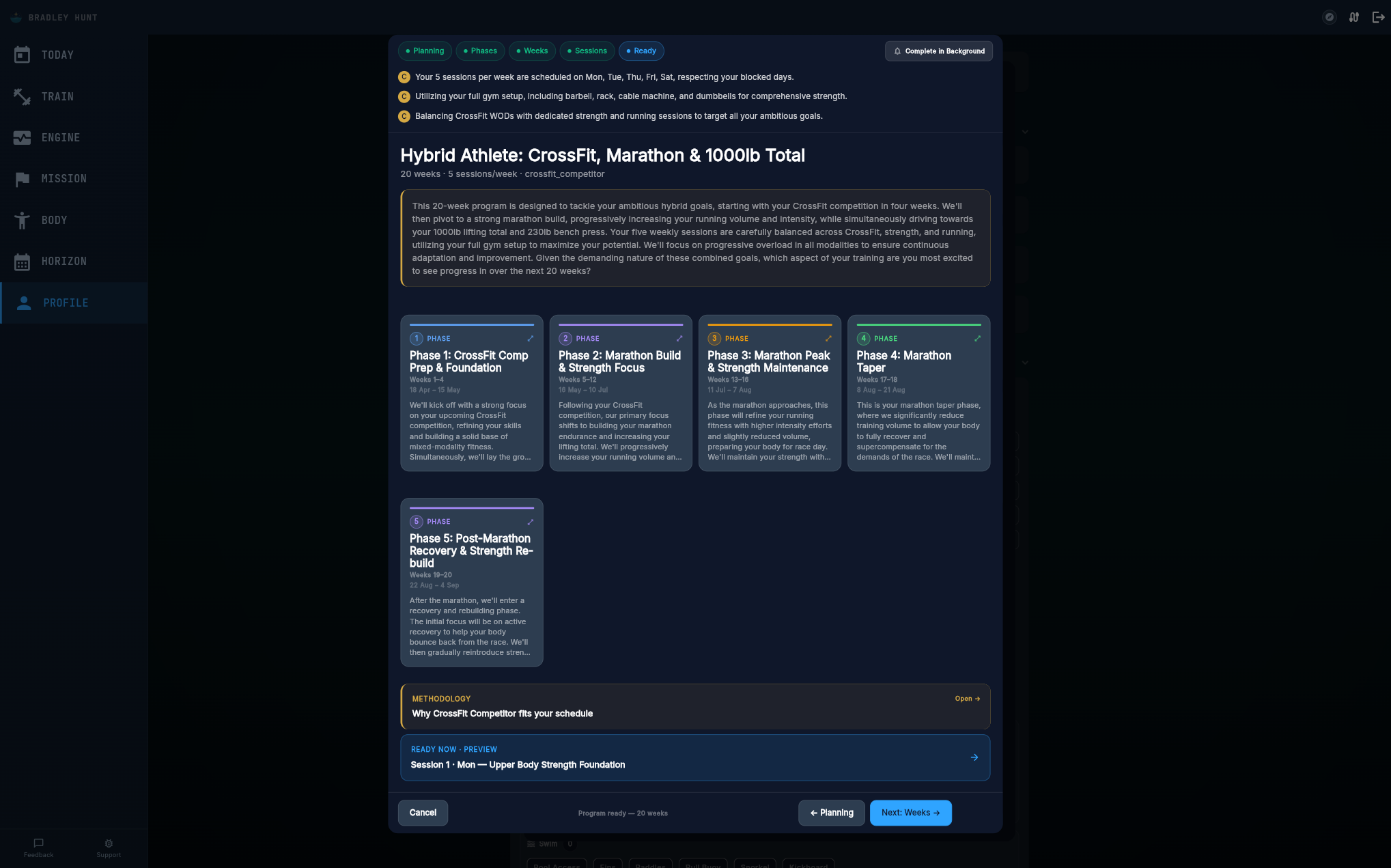 Phases tab. Cards appear progressively as the AI decides the macro structure. Each phase has a distinct focus and timeline.
By the time the full program lands, you’ve already been browsing your phase structure for 30 seconds. Wall-clock generation time is similar, but the perceived wait dropped dramatically. You were watching your program take shape the entire time.
Week-by-week structure
Once phases are set, the Weeks tab shows your entire program timeline. Each week has a focus description, session count, and the phase it belongs to. You can scan 20 weeks of periodised training at a glance and understand the progression arc.
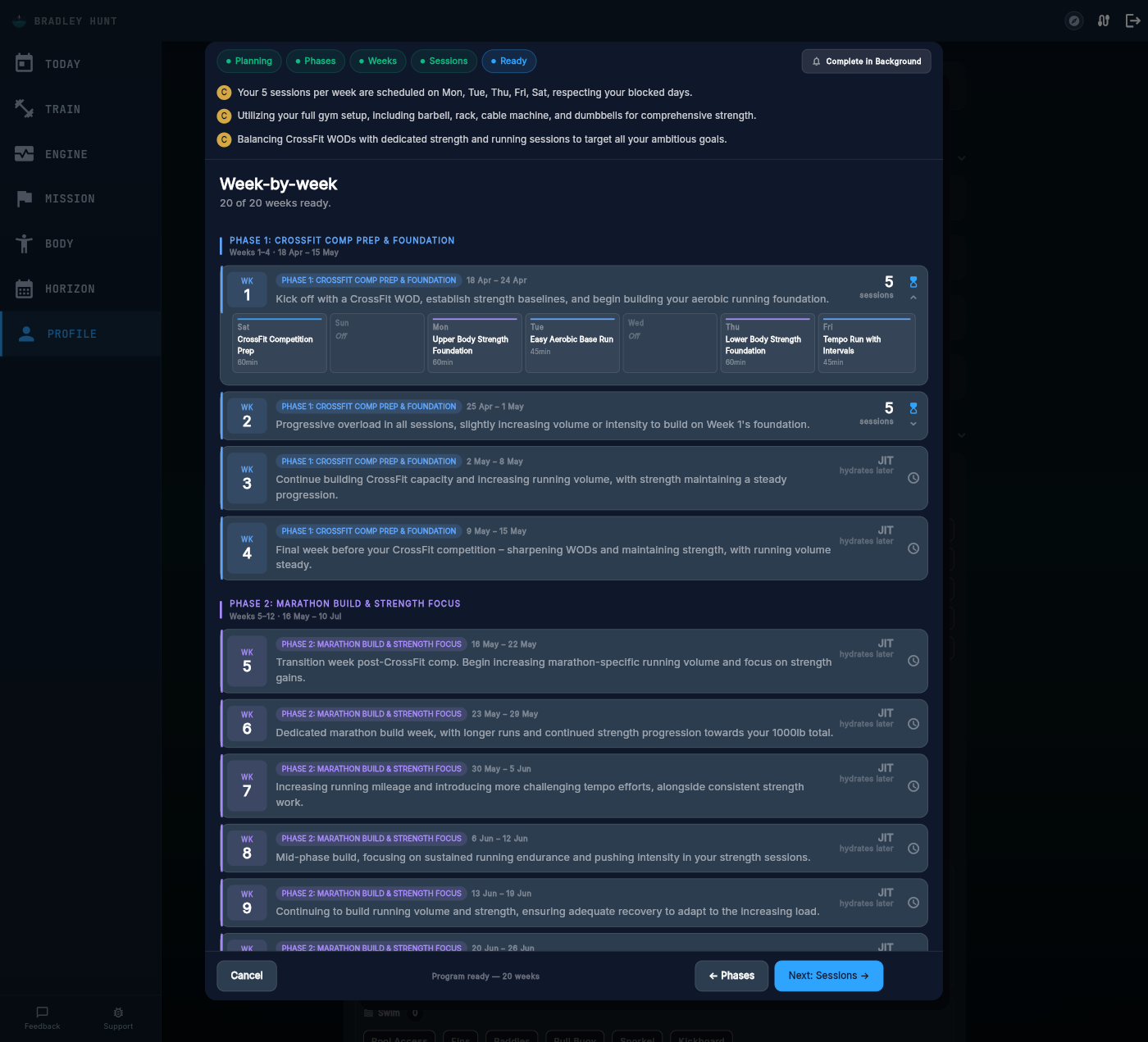 Weeks tab. Every week has a clear focus, session count, and phase alignment. Scan the entire program structure at a glance.
Sessions with real detail
Drill into any week and you see individual sessions with full exercise detail. Warmup blocks, main sets, cooldown, all with named exercises, set counts, and rep targets. Coach notes explain the reasoning behind each session’s design.
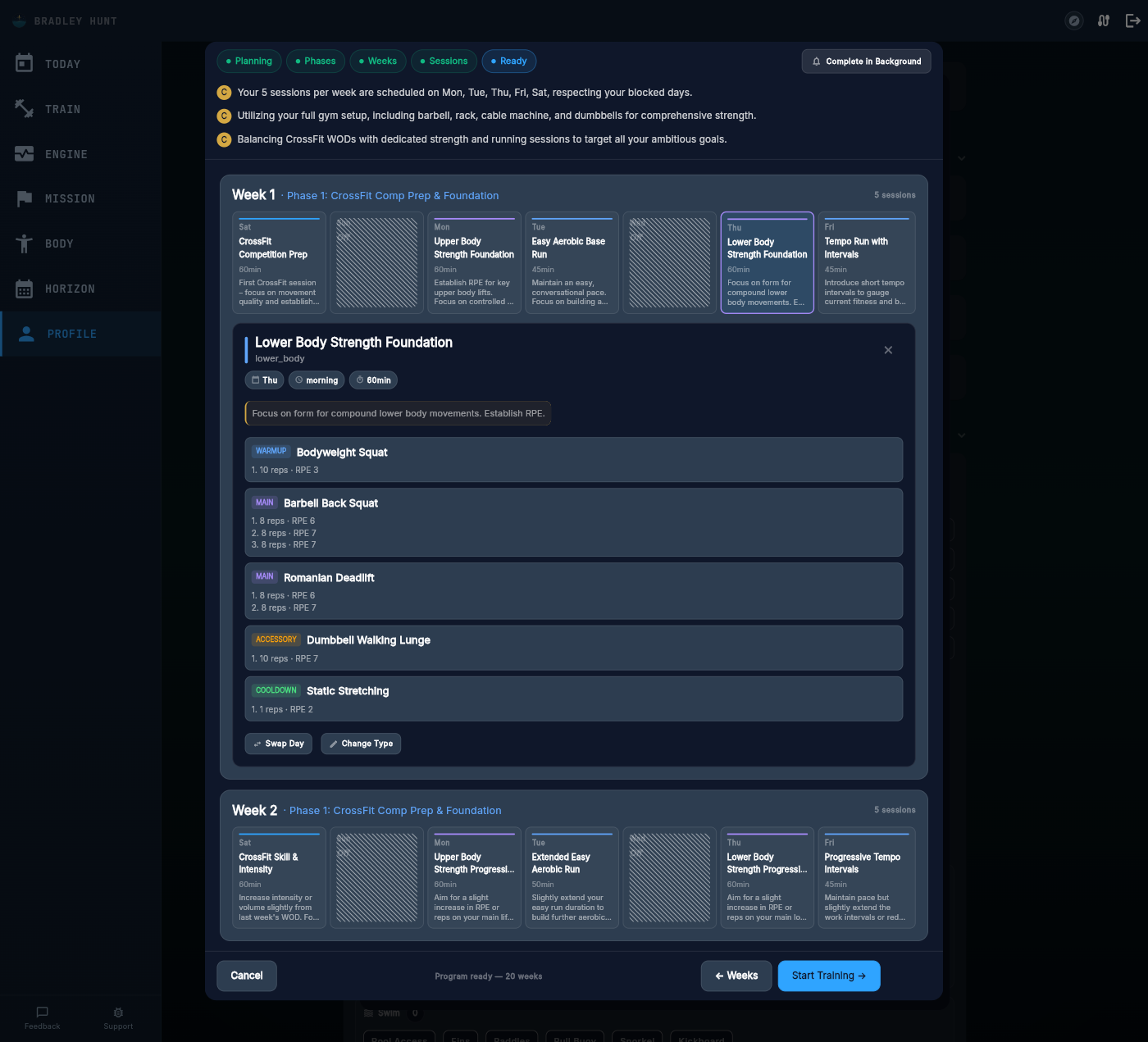 Sessions tab. Full exercise detail, named movements, set/rep targets, block structure. No more placeholders.
Compare this to the old session view:
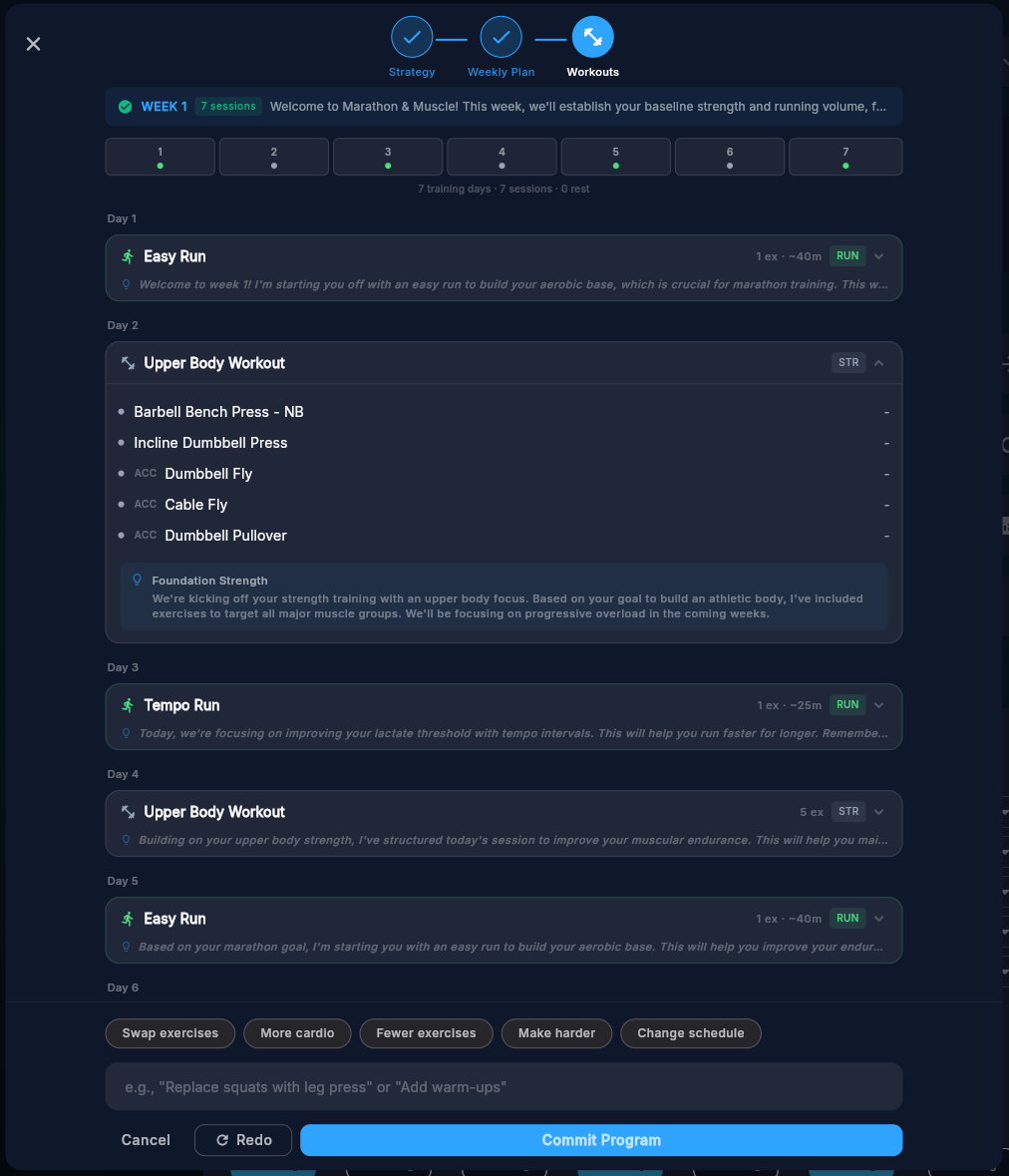 Before: The old workouts stage. Basic session summaries with less exercise detail and no streaming.
AI-first exercise classification
Previously, the system used keyword matching to decide whether an exercise was strength or cardio. If the name contained “swim” or “run”, cardio. Otherwise, strength. So “Easy Freestyle” was classified as strength because the word “swim” doesn’t appear in it. Kick Drills, Sculling Drills, Tempo Intervals, all wrong.
Now the AI classifies every single set. The generation schema requires a set type on every set, and the commitment pipeline reads that classification directly. No keyword guessing. The AI decided, the code follows.
This fixes a whole category of bugs: swim sessions with empty set data, running intervals showing strength fields, cardio sessions displaying weight columns instead of distance and pace. If you’re a triathlon or hybrid athlete, you’ll notice the difference immediately.
Block structure that actually makes sense
Sessions now display proper warmup, main set, cooldown, and accessory labels on every block. Previously, everything showed as “Main Set” because two handoff points in the pipeline were silently dropping the semantic types the AI generated.
Fixed at the root. The Overview tab shows correct block grouping. The Track tab groups exercises under proper headers. And if a session somehow ends up with empty sets (rare edge case), the exercise still appears with an “Add Set” button so you can configure it manually. No more blank screens.
Smart distance display
Small detail, big difference. Tracking columns now adapt their units to the actual distance. 100-meter strides show “100” under an “M” header. 5km runs show “5” under “KM”. Previously, 100m strides showed “100” under a “KM” header. Looks like a casual hundred-k sprint.
Works consistently everywhere: running intervals, cycling hill repeats, rowing ergometer pieces, any distance-based cardio. One formatting service handles it all.
Your rest days are actually rest days
A bug that’s been hiding since launch: if your program started on any day other than Monday and you had a blocked day like Saturday, the calendar could place sessions on your rest day anyway.
Fixed across five layers: server prompt, client projection, finalizer validation, JIT scheduler, and the session preview widget. Your blocked days are hard constraints now. Everywhere in the system.
What’s next
This release stabilises the foundation. Intake to generation is now a single, streaming, AI-first experience. The data pipeline correctly classifies exercises, preserves block structure, and respects your preferences end-to-end.
The methodology library keeps growing with 30+ enriched training approaches across strength, running, swimming, cycling, triathlon, and CrossFit. Generation quality improves with every prompt iteration. And a guides hub is coming to pelaris.io with training articles covering everything from AFL periodization to cricket pre-season programming, basketball off-season strength work, and rugby conditioning protocols.
For athletes returning to training after illness or a long break, the improved intake captures exactly where you are right now. For intermediate athletes who’ve hit the ceiling of generic plans, the AI-first approach tackles the core problem: why those plans stop working once you’re past the beginner phase. Pelaris builds from your actual training history, equipment, schedule, and goals.
The core principle hasn’t changed: if a decision requires understanding, the AI makes it. Code handles execution. That distinction drove every choice in this release.
What this means for your training
- Every set has concrete targets now. Effort ratings, weight percentages, pace zones, distance. No more empty placeholders or zero-value fields.
- Your schedule is respected exactly. Blocked days, preferred training times, team sport commitments, all enforced across every layer of generation.
- Swim, run, and hybrid programs track properly. Distance, duration, and pace fields appear automatically based on what the AI classified, matching the sport you’re actually training.
- You can start training immediately. Skip the full intake on screen one, start logging workouts, come back to build your full program when you’re ready.
- Returning users pick up where they left off. Draft answers are preserved, version migrations happen in the background, and a resume tile shows your exact spot.