Pelaris in Claude
Your AI fitness coach,
inside Claude
Pelaris connects your real training program to Claude. Ask about your week, log a session or rework your plan, and Claude answers from your actual training, not a guess. It even fits on Claude’s free plan.
Updated 28 October 2026
Also on your phone


A real AI fitness coach in Claude
Pelaris is an AI fitness coach that builds and continuously adapts one training plan across strength and endurance. Connected to Claude, it gives Claude 29 tools over the open Model Context Protocol: 13 that read your training and 16 that change it, every change confirmed with you first.
Ask Claude on its own for a workout plan and you get something sensible but generic, written from scratch with no memory of what you actually did. With Pelaris connected, Claude reads your enrolled program, your logged sessions and your benchmarks, then writes changes back to the same program you open in the app tomorrow.
How to connect Pelaris to Claude
About two minutes, no API keys and no config files. The address to add:
Open Connectors in Claude
In Claude, go to Customize, then Connectors (on some versions, Settings, then Connectors).
Add a custom connector
Select Add, then Add custom connector. Name it Pelaris, paste https://api.pelaris.io/mcp and select Continue.
Connect your Pelaris account
Claude detects the sign-in for you. Select Add, then Connect. Sign in to Pelaris, or create your free account, and approve the access you want to give.
Say "Get me started with Pelaris"
New to Pelaris? Claude asks a few questions and hands you a link to your new program. Already training with us? It picks up where you are.
What to ask your coach in Claude
Every one of these runs a real tool against your account, then tells you what it did.
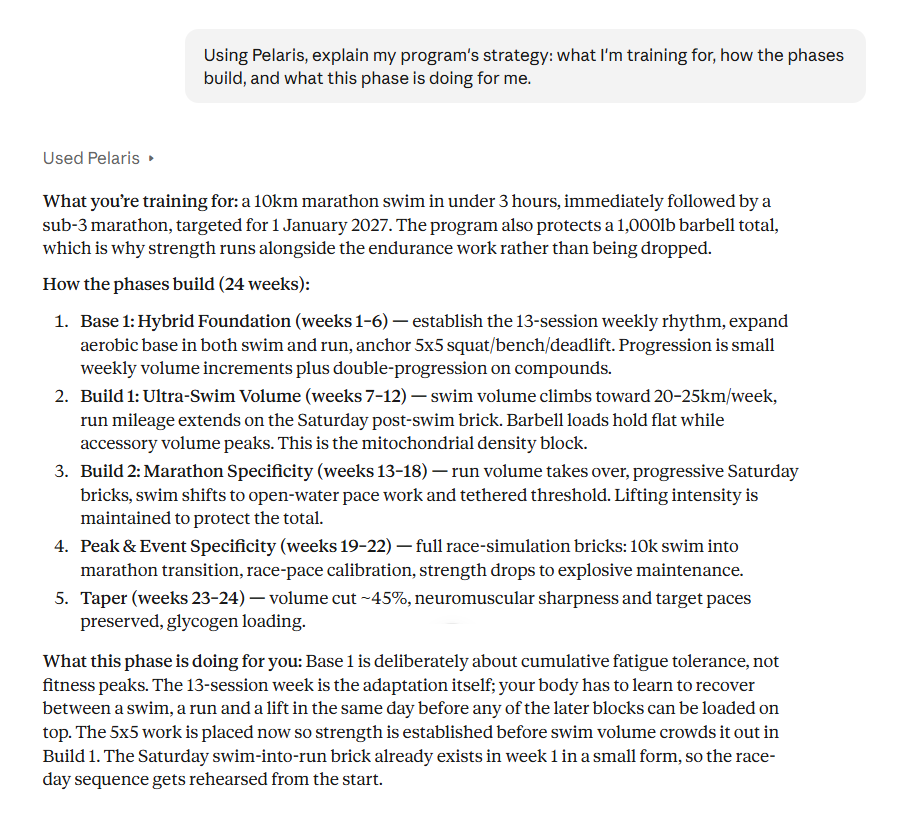
“Walk me through the phases of my program and why they’re in that order.”
Reads your program and explains the reasoning behind each block.
“How did this week compare with last week?”
Pulls your weekly debrief and compares completion, load and highlights.
“Log my session: 3x8 Romanian deadlift at 80 kg, felt easy.”
Writes the sets to your history, with PR detection.
“I’ve got a wedding on Saturday. Rework my weekend.”
Moves and reshapes the weekend sessions so the week still makes sense.
Every tool, what it reads or changes: the Pelaris MCP tools.
Why train with Pelaris in Claude
- Claude is brilliant at the thoughtful side of coaching: the why behind your program, how a hard week fits the bigger picture, what to do after a setback.
- Long, careful answers suit planning a training block, a race build or a return from injury.
- Works on the web, desktop and the Claude mobile app once connected.
One coach, every AI assistant
Same account, same program, wherever you chat. Pelaris also works in:
Read the full story: your AI fitness coach, inside every AI assistant.
ChatGPT, Claude, Grok, Gemini and Le Chat are trademarks of their respective owners. Pelaris is independent and not affiliated with or endorsed by them.
Pelaris in Claude, answered
What address do I add in Claude? +
Does Pelaris work in Claude Desktop and the Claude mobile app? +
Can I use Pelaris on Claude’s free plan? +
Is Pelaris in Claude free? +
Is my training data private when I use Claude? +
Does it work with the Pelaris app? +
Bring your coach into Claude
Add Pelaris, connect your account and ask for tomorrow’s session. Tracking is free, coaching is optional, and the same program follows you onto your phone.