technology · general
Your AI fitness coach, inside every AI assistant: ChatGPT, Claude, Grok, Gemini and Le Chat
Most people already have an AI assistant open all day. Now your coach lives in it too.
Pelaris is the only AI fitness coach that works inside ChatGPT, Claude, Grok, Gemini and Le Chat. Not a prompt pack. Not a chatbot that forgets you next week. A live connection to your real training program, your logged sessions and your benchmarks, so whichever assistant you love, it can plan, log and adapt your training with you.
One coach. One program. Every assistant.
Why this matters
Ask any assistant on its own for a workout plan and you will get something decent. What it can’t do is remember. It doesn’t know you missed Thursday, that your squat has stalled for three weeks, or that your calf has been grumbling since the weekend. Every chat starts from zero. We wrote about that gap in what general-purpose AI gets wrong about your training plan.
Connect Pelaris and that changes. Your assistant keeps the conversation. Pelaris keeps the program, your history and the coaching logic. Every answer comes from your actual training.
Start the same way everywhere
Whichever assistant you use, connect Pelaris, then say:
Get me started with Pelaris
New to Pelaris? Your assistant asks a few quick questions about your goals, sport and schedule, then hands you a link that opens a full program built around you. Already training with us? It picks up exactly where you are.
The connector address is the same everywhere:
https://api.pelaris.io/mcpA fitness program in ChatGPT
Pelaris is an app inside ChatGPT. Open the Plugin Directory, search for Pelaris, connect, and you have an AI fitness coach in ChatGPT that reads and updates your real program.
Try:
- “Plan my week around a Saturday parkrun.”
- “Log yesterday’s session, 5x5 back squat at 100 kg.”
- “Why is today easy?”
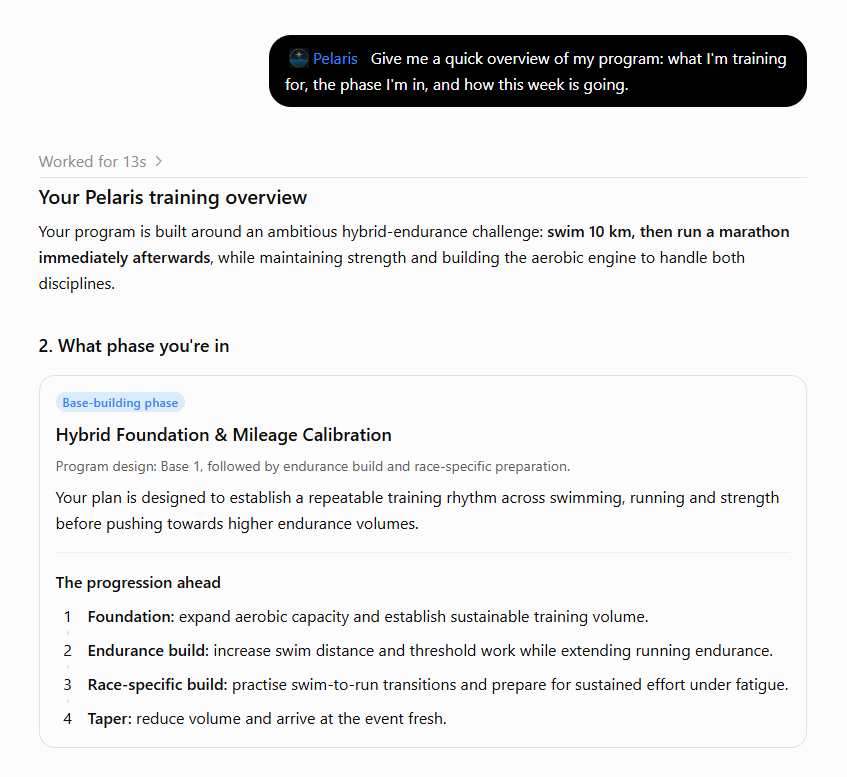
More: The ChatGPT fitness plugin · Set-up guide
A workout plan in Claude
Claude shines at the thoughtful side of coaching: why your program is shaped the way it is, how a hard week fits the bigger picture, what to do after a setback. Add Pelaris as a connector and Claude works from your real training plan, on the web, desktop and the Claude app. It even fits on Claude’s free plan, which allows one custom connector.
Try:
- “Walk me through the phases of my program and why they’re in that order.”
- “How did this week compare with last week?”
- “I’ve got a wedding on Saturday. Rework my weekend.”
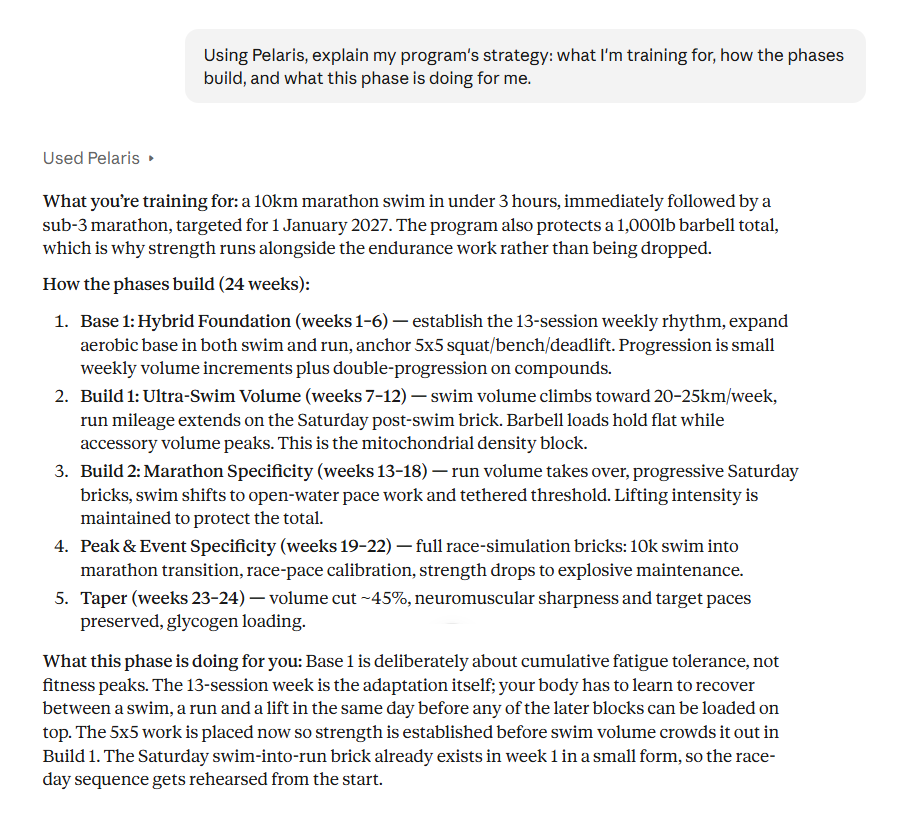
More: Pelaris in Claude · Set-up guide
An AI training plan in Grok
Grok lets you bring your own connectors, so you can have your real Pelaris training plan right inside Grok. Open Plugins, then Connectors (it works on the free plan), add a custom connector with the Pelaris address, sign in, and Grok becomes your training partner.
Try:
- “What’s my session today?”
- “I’m travelling with only a hotel gym. Adjust tomorrow.”
- “Log my run: 8 km easy, 45 minutes.”
More: Pelaris in Grok · Set-up guide
A fitness coach in Gemini
Gemini supports custom apps, and Pelaris is one of them. Add it once under Customise, Connectors, + Custom, then type @Pelaris in any chat. It works on the web and in the Gemini app on your phone. Google opens custom apps to personal accounts, 18 and over, in English; its help lists the US, and we connected Pelaris from Australia on 29 Oct 2026.
Try:
- “@Pelaris what’s my session today?”
- “@Pelaris how is my squat trending?”
- “@Pelaris log my swim: 2 km in 42 minutes.”
More: Pelaris in Gemini · Set-up guide
A workout plan in Le Chat
Mistral’s Le Chat lets anyone add a custom connector, even on the free plan. Add Pelaris and Le Chat can plan, log and adapt your training with you.
Try:
- “Log my ride: 40 km, 1 hour 20, felt heavy-legged.”
- “How did my training go this week?”
More: Pelaris in Le Chat · Set-up guide
Any other assistant
Pelaris speaks the open Model Context Protocol (MCP), the standard AI assistants use to connect to apps. If your assistant lets you add a custom connector, app or MCP server, paste the Pelaris address and you’re in. Here’s the guide for any AI assistant, and every tool your assistant gets is listed on the Pelaris MCP tools page.
What your assistant can do with Pelaris
Once connected, every assistant gets the same coaching toolkit:
- Plan: see today’s session, your week and your whole program. Add or reshape sessions.
- Log: describe a workout in plain language and it’s written to your history, with PRs detected.
- Adapt: sore, travelling, short on time or flying? Say so and your week reshapes around it.
- Understand: weekly debriefs, coach insights, benchmarks and trends, all from your real data.
- Check in: tell it how you slept and how you feel, and your coach adjusts.
Anything that changes your training is confirmed with you first. You approve what each assistant can access, and you can disconnect any time, from the assistant or in Pelaris under Connected Apps.
Same program on your phone
The assistant is where you talk it through. The Pelaris app is where you train: the session screen, the set logger, your progress and body views, built for the gym floor. Use either, use both. Everything syncs. Get the Pelaris apps for iOS and Android, or start free on the web.
Your data stays yours
Access is scoped and approved by you. Our privacy scrubber removes personally identifiable information from everything that crosses the connection, and your data is never sold. More in how Pelaris handles your data.
Pick your assistant and start today
| Assistant | How to connect | Guide |
|---|---|---|
| ChatGPT | Plugin Directory, search “Pelaris” | Connect to ChatGPT |
| Claude | Customize, Connectors, Add, Add custom connector | Connect to Claude |
| Grok | Plugins, Connectors, New Connector, Custom | Connect to Grok |
| Gemini | Customise, Connectors, + Custom | Connect to Gemini |
| Le Chat (Mistral Vibe) | Context, Connectors, New connector, New custom connector | Connect to Le Chat |
| Anything else with MCP | Add https://api.pelaris.io/mcp | Any AI assistant |
Wherever you chat, your coach is there. See you out there.
ChatGPT, Claude, Grok, Gemini and Le Chat are trademarks of their respective owners. Pelaris is independent and not affiliated with or endorsed by them.