Apps and devices
Connect Pelaris to Claude
Last updated
Claude is great at the deep, thoughtful side of coaching: why your program is shaped the way it is, how a hard week fits the bigger picture, what to do after a setback. Connect Pelaris and Claude works from your real program and history.
Connect
- In Claude, open Customize, then Connectors (on some versions, Settings, then Connectors).
- Select + Add, then Add custom connector.
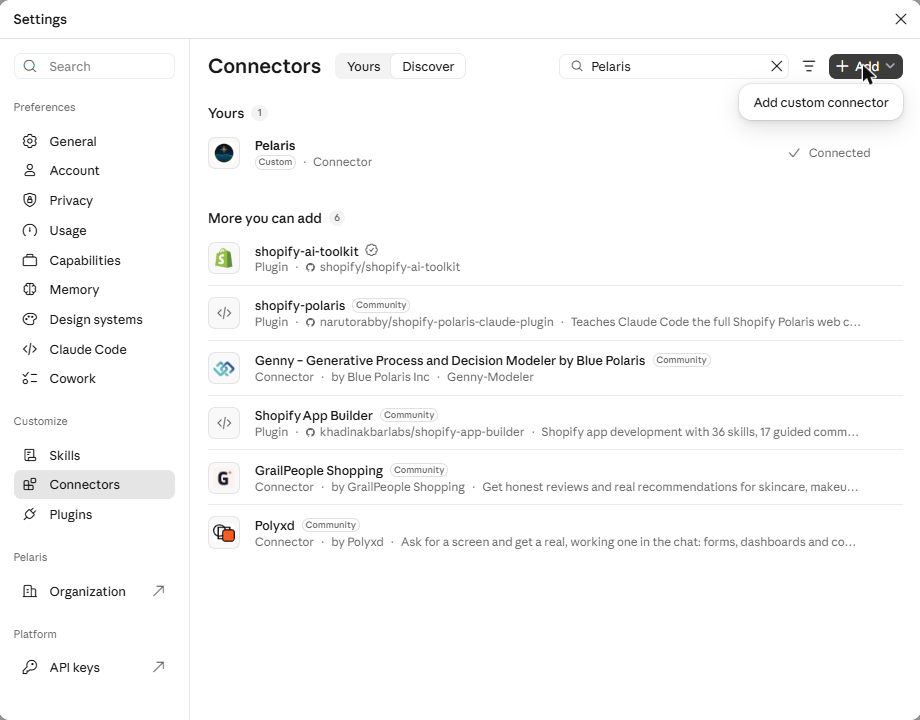
- Name it Pelaris, paste this address and select Continue:
https://api.pelaris.io/mcp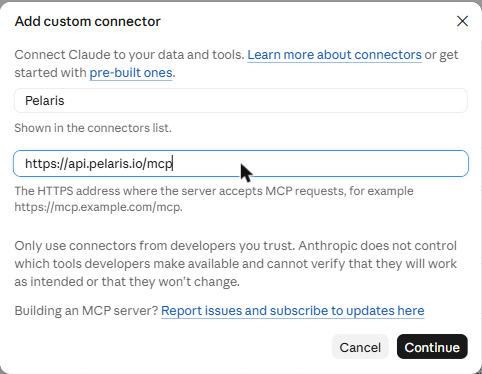
- Claude detects how Pelaris signs you in, so you can keep its suggested settings. Select Add, then Connect.
- Sign in to Pelaris (or create your free account) and approve the access you want to give.
- Start a new chat and say: “Get me started with Pelaris”.
Once connected, Pelaris works in Claude on the web, on desktop and in the Claude mobile app.
What to ask next
- “Walk me through the phases of my program and why they’re in that order.”
- “How did this week go compared with last week?”
- “Log my session: 3x8 Romanian deadlift at 80 kg, felt easy.”
- “I’ve got a wedding on Saturday. Rework my weekend sessions.”
Disconnect
- In Pelaris: open Connected Apps and find Claude under AI Assistants.
- In Claude: open Customize (or Settings), then Connectors, and remove Pelaris.
Your training history stays in Pelaris.
If something goes wrong
If sign-in loops or Claude says it cannot reach Pelaris, remove the connector and add it again. Still stuck? Contact us.
Using another assistant too? See use Pelaris in your AI assistant.
Why train with Pelaris in Claude? See Pelaris in Claude.
Frequently asked questions
What address do I add in Claude?
https://api.pelaris.io/mcp
Can I use it on Claude's free plan?
Claude's free plan lets you add one custom connector, so yes, Pelaris can be that one. Paid Claude plans can add more.
I am on a Claude Team or Enterprise plan. Why can't I add it?
On those plans an organisation owner adds connectors first. Ask your owner to add Pelaris, then connect it with your own Pelaris account.