Apps and devices
Connect Pelaris to Grok
Last updated
Grok doesn’t list Pelaris in its catalog yet, but you can add it yourself in a couple of minutes. Once connected, Grok can read your real program, log your sessions and adjust your week with you.
Connect
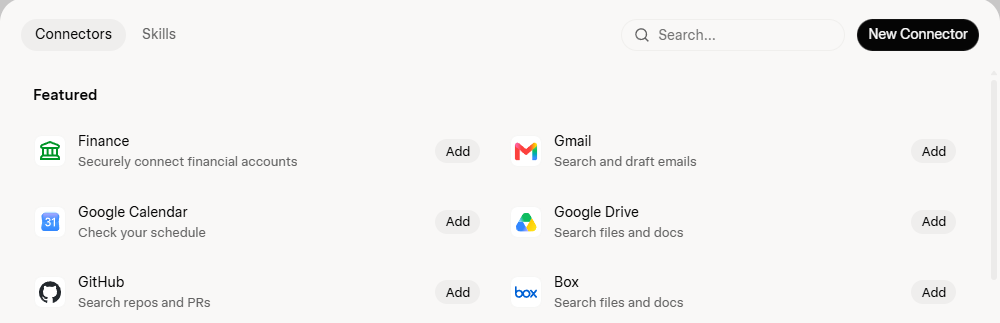
- In Grok, open Plugins in the sidebar, then Connectors (or go straight to grok.com/connectors). The free plan works.
- Select New Connector, then Custom.
- Name it Pelaris, paste this address and select Add Connector:
https://api.pelaris.io/mcp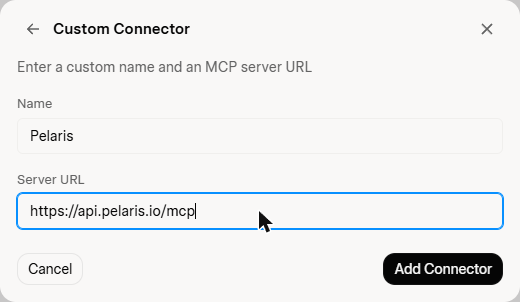
- A sign-in window opens. Sign in to Pelaris (or create your free account), approve the access you want to give and select Allow. If your browser blocks pop-ups, allow them for grok.com and try again.
- Back in Grok, start a chat and say: “Get me started with Pelaris”.
If you are new, Grok asks a few quick questions and hands you a link that opens your new program in Pelaris. If you already train with us, it picks up your current program.
On Grok Business or Enterprise, your admin needs to add the connector for your team first.
What to ask next
- “What’s my session today?”
- “Log my run: 8 km easy, 45 minutes.”
- “How did my training go this week?”
- “I’m travelling with only a hotel gym. Adjust tomorrow’s session.”
Disconnect
- In Pelaris: open Connected Apps and find Grok under AI Assistants.
- In Grok: open Plugins, then Connectors (grok.com/connectors), and remove Pelaris.
Your training history stays in Pelaris.
If something goes wrong
If sign-in loops or Grok can’t reach Pelaris, remove the connector and add it again. Still stuck? Contact us.
Using another assistant too? See use Pelaris in your AI assistant.
Why train with Pelaris in Grok? See Pelaris in Grok.