Apps and devices
Connect Pelaris to Gemini
Last updated
Gemini lets you add your own apps, and Pelaris is one of them. Connect it once and Gemini can read your program, log your workouts and adjust your week with you.
Before you start
Google currently allows custom apps for:
- personal Google accounts (not work or school)
- people aged 18 or over (Google’s help lists the US; we connected from Australia on 29 Oct 2026, so try it wherever you are)
- Gemini in English, with Keep Activity turned on
If that is not you yet, Pelaris works in ChatGPT, Claude and other assistants.
Connect
- Open gemini.google.com, open Customise in the sidebar, then Connectors (on some versions, Settings, then Connected Apps).
- Select + Custom.
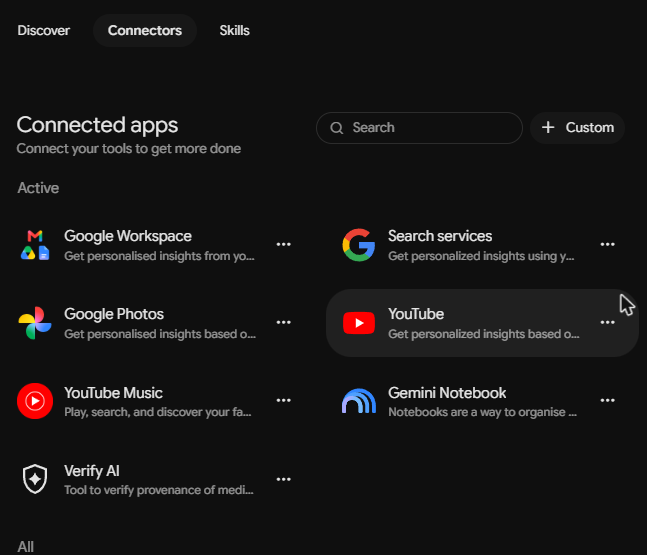
- Paste this address, read Google’s note about custom apps, and select Next:
https://api.pelaris.io/mcp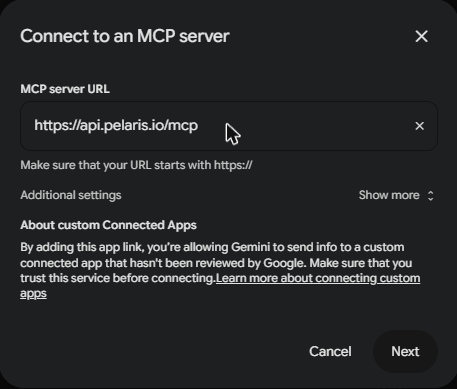
- Sign in to Pelaris (or create your free account) and approve the access you want to give.
- Name the app Pelaris and select Connect. Gemini lists all of Pelaris’s actions.
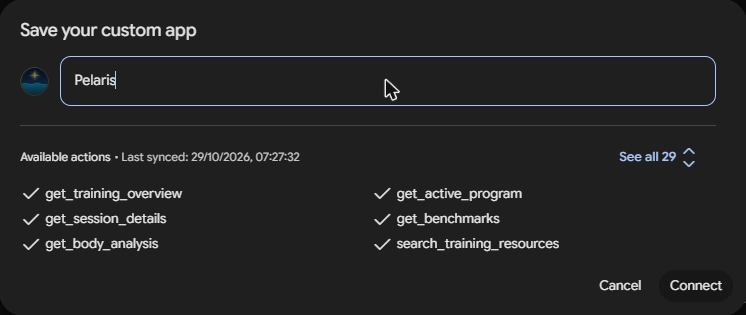
- In a new chat, type @ and pick Pelaris, then say: “Get me started with Pelaris”.
Once connected, Pelaris works in Gemini on the web and in the Gemini app on your phone.
What to ask next
- “@Pelaris what’s my session today?”
- “@Pelaris log my swim: 2 km in 42 minutes.”
- “@Pelaris how is my squat trending?”
Disconnect
- In Pelaris: open Connected Apps and find Gemini under AI Assistants.
- In Gemini: open Customise, then Connectors (or Settings, Connected Apps), and remove Pelaris.
Your training history stays in Pelaris.
If something goes wrong
If sign-in finishes but Gemini doesn’t show Pelaris as connected, or keeps asking you to sign in, remove the app and add it again. Still stuck? Contact us.
Why train with Pelaris in Gemini? See Pelaris in Gemini.
Frequently asked questions
Who can add custom apps in Gemini?
Google sets the rules. Custom apps need a personal Google account, age 18 or over, with Gemini in English and Keep Activity turned on. Google's help still lists the US, and we connected Pelaris from an Australian Google AI Pro account on 29 Oct 2026, so give it a try wherever you are. Work and school accounts can't add them yet.
Is Pelaris in Gemini's app list?
Not yet. Google doesn't take third-party listings for Gemini today, so you add Pelaris yourself as a custom app.
Do I need a Pelaris account?
You create your free account during the sign-in step if you do not have one yet.