Bring your history with you: import your Garmin, COROS, Suunto, Wahoo and Polar sessions
Pelaris now reads FIT files. Drop in your sessions from Garmin, COROS, Suunto, Wahoo or Polar and your coach starts from everything you have done.
On this page (6 sections)
Your watch has been keeping a record of every session you have trained. The 5am swims. The long run in the rain. The ride where everything clicked. Starting with a new coach should never mean leaving that behind.
From today, Pelaris reads FIT files, the workout file almost every sports watch and bike computer writes. Garmin, COROS, Suunto, Wahoo and Polar all write it. Export your sessions, drop them in, and your history comes with you.
Export once, drop it in
- Export your sessions from your watch’s app or website. Garmin can send your whole history in one request. COROS can send everything from Training Hub. Suunto, Wahoo and Polar export a session at a time. The steps for each brand are in the guide.
- Open Pelaris at coach.pelaris.io, go to Profile, Data, Bring your history across, and drop your files onto the page.
- Check the preview and choose Bring them across.
That is the whole job. Pelaris reads every file, puts each session on its real date in the time zone your watch recorded, and sorts the rest out for you. The short version, with every message you might see, is in Import FIT files from your watch.
What Pelaris does with each file
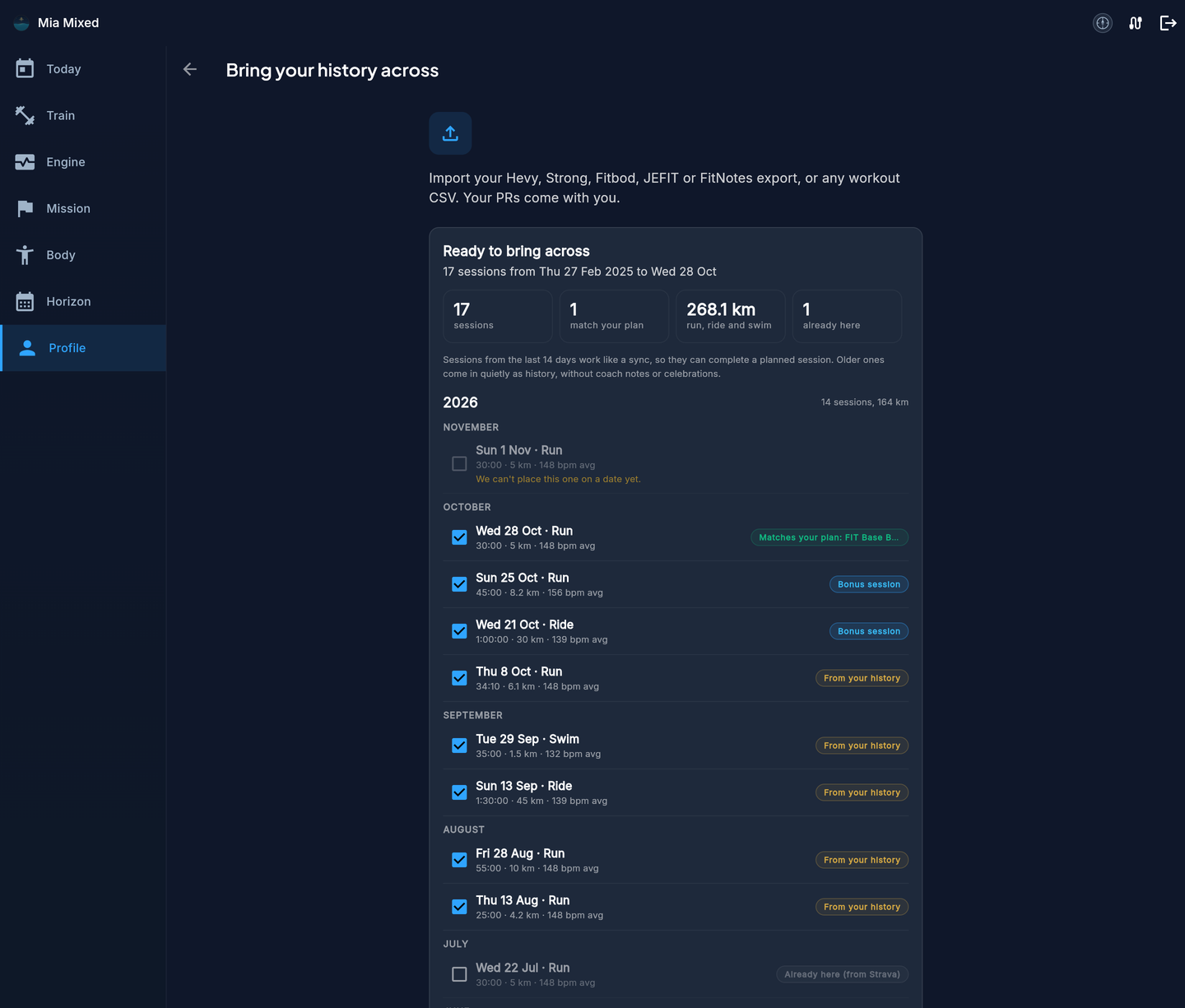
Recent sessions complete your plan. A run from this week that lines up with a planned run in Pelaris marks that session done, with your real time, distance, heart rate and laps on it. Anything beyond the plan arrives as a bonus session.
Older sessions become your history. Everything from before the last two weeks lands quietly on its real date. It shows in Train, it counts toward your totals, and it gives your coach years of context to plan from.
Nothing is counted twice. If Garmin Connect, Strava or Polar already brought a session in, the preview marks it Already here and leaves it unticked. Bring it across anyway and it joins the existing session as a second source, never a copy. Upload the same file twice and nothing doubles.
Laps and lengths come across as recorded. Your intervals, your auto laps, every length of a pool swim with its strokes. Multisport days, like a triathlon, arrive one leg at a time.
You see everything before it is saved
Before anything is added, Pelaris shows you what it found, grouped by year and month. Each session says whether it matches your plan, is a bonus session, is from your history, or is already here. Untick anything you would rather leave out. Then one button brings the rest across.
Your files stay yours
Your files are read in memory and immediately discarded. Pelaris never keeps the file or your GPS route. It keeps the workout summary and laps, the same kind of detail a connected watch sends. Your data is never used to train any AI model. And because your data is yours, exporting it back out is free, any time.
Importing is free. Logging and tracking in Pelaris are free forever. Bringing your history in never starts a trial or a paywall.
Every way to bring your history across
FIT files join the imports Pelaris already reads:
- Strength apps: export a CSV from Hevy, Strong, Fitbod, JEFIT or FitNotes and your sets, reps, weights and PRs come with you. Here is how.
- Connected apps: connect Garmin Connect, Strava, Polar, Apple Health or Health Connect once, and new sessions arrive on their own.
- Watch files: Garmin, COROS, Suunto, Wahoo and Polar, from today.
Training across a few of these? Bring them all. Pelaris lines them up on one timeline and counts each session once.
Start from where you really are
The most useful thing a coach can know is what you have actually done. Not a questionnaire’s guess, but the record: the blocks you built, the races you ran, the weeks life got in the way. Bring it with you, and your plan starts from where you really are.