Pelaris 1.5: Garmin Connect two-way sync, a rebuilt Today screen, and the Partner Programme
Pelaris 1.5 connects Garmin Connect both ways, rebuilds Today around your morning check-in and finished sessions, and opens the Pelaris Partner Programme.
On this page (7 sections)
Pelaris 1.5 is live on the web at coach.pelaris.io, rolling out to the App Store and Google Play as each store approves the update.
Last week we shipped FIT file imports so years of watch history could come with you on day one. This release closes the loop. Garmin Connect now connects both ways, so new sessions flow in after every watch sync and your planned workouts go straight out to your wrist. Alongside it, we rebuilt the Today screen around the rhythm of an actual training day, reworked session milestones so they celebrate the habit you are building now, and opened the Pelaris Partner Programme.
Garmin Connect, both ways
A watch is brilliant at recording what you did and guiding you through intervals on the road or in the pool. What it does not do is rewrite Thursday’s threshold session when Tuesday’s long run ran hot and Wednesday’s sleep fell apart. Connecting Garmin Connect to Pelaris pairs the two jobs.
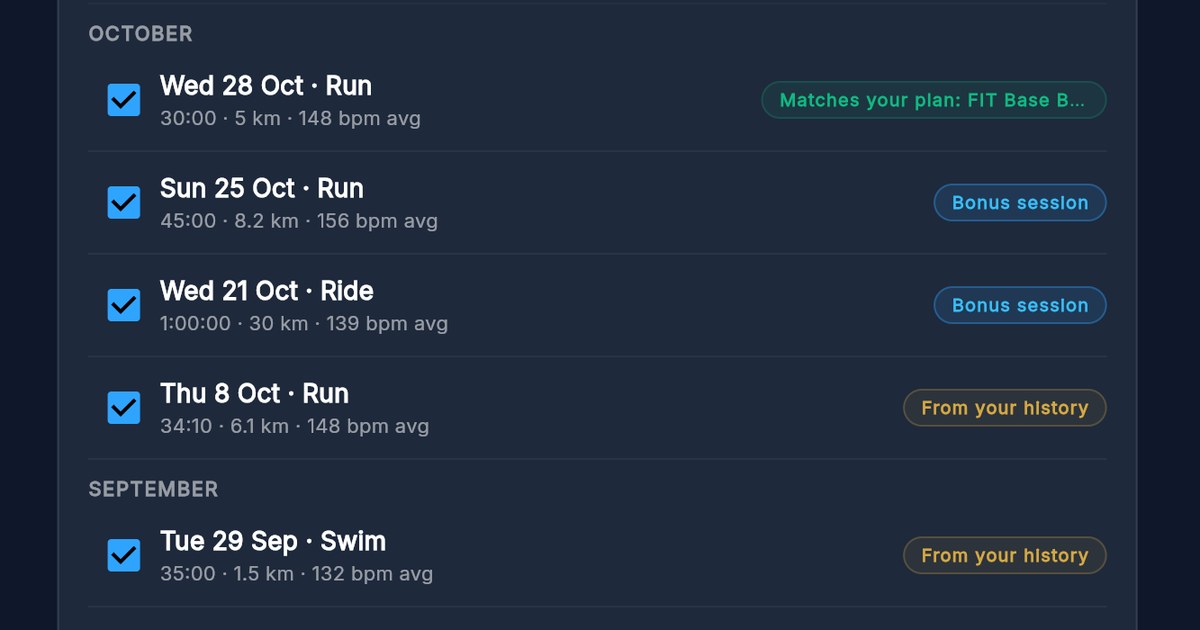
Completed sessions arrive on their own. Click Connect & Sync in the bottom-left navigation bar (or open Profile, then Connected Apps) and link your Garmin account. Every run, ride, swim and gym session you record on your Garmin device flows into Pelaris as soon as your watch syncs with Garmin Connect. When a synced activity matches a planned session on your schedule, Pelaris marks that session done with your real time, distance, heart rate, pace, elevation and laps, and tags it with your watch model, such as Garmin Forerunner 965.
Planned workouts land on your watch. Turn on Send planned workouts to my watch when you connect, flip the switch any time on the Garmin card in Connected Apps, or tap Send to watch directly on any planned session card in Today or Train (and under the Start Session button on the session Overview screen). Pelaris sends the next two weeks of your planned run, ride, pool swim, strength, cardio, yoga and pilates sessions to your Garmin Connect calendar as structured workouts, complete with warm-ups, target zones, intervals and recoveries.
Your watch stays in step when your plan adapts. When your coach adjusts an upcoming session after a hard week, Pelaris updates the workout on Garmin Connect automatically. Open any session in Pelaris to see its status: On Garmin Connect. Sync your watch to load it, or a plain note if a session type does not use a watch workout.
Zero duplicates across Strava, Polar and FIT files. Many Garmin athletes also sync to Strava, and plenty of you brought older blocks in through our FIT file importer. Pelaris runs every incoming activity through one unified merge gate. When the same morning run arrives from Garmin Connect and from Strava, they join into one session on your timeline with both sources credited, never counted twice. If you want to bring in years of Garmin training from before you connected, the step-by-step is on Pelaris for Garmin and in Import FIT files from your watch.
Privacy stays strict. Pelaris imports workout summaries, laps and your device name, never your GPS route or map, and your training data is never used to train any AI model. Garmin Connect works on every plan, including the free Beach tier. You can see how it sits alongside Apple Health, Health Connect, Polar, Strava and our AI assistant connectors on the integrations page.
A Today screen built around your day
In Pelaris 1.4, First Light, we focused on getting a new athlete to their first session cleanly. Once you are training four or five days a week, though, you open the Today screen (what we call the Beach in how Pelaris works) at three very different moments: first thing in the morning to check the plan, straight after a workout to see how it landed, and in the evening to wind down and check tomorrow.
Until now, Today showed roughly the same stack of cards at 6am and at 8pm. In 1.5, Today resolves your day state and puts the right surface at the top.
Your coach leads at the top of Today. The new Coach Hero card opens the page with the date, your Monthly Horizon link, and a single time-aware question from your coach. Before you have checked in, three quick-reply chips sit right below the message bar: Feeling great, A bit tired, and Sore somewhere. Tap one, or type a note in your own words, and your coach logs your daily readiness and sleep straight into your check-in and responds in place. Once you have checked in, those chips swap to live state chips that open your readiness summary, today’s session, or your training week. If you still prefer the classic standalone check-in tile below the Beach path, you can switch it back on any time under Profile, Features.
One Completed Day card when the work is done. Previously, finishing a session left a thin ribbon at the top while your actual metrics, muscles and coach summary lived inside separate tabs. Now, when your day’s training is complete, Today promotes a single unified Completed Day card. Train once, or finish a morning swim and an evening lifting session on a double day, and the card combines them into one view:
- Total duration, volume, distance and sets across every session you finished today
- Source attribution badges for Pelaris, Garmin, Strava, Polar or imported FIT files
- The combined muscle map for strength sessions, plus any personal record you set
- Your coach’s session note and one-tap buttons to open the Share studio or inspect the full session
A tighter Coach’s brief and the For You feed. Below the hero, your daily read is now a compact Coach’s brief that shows the two lines that matter most and expands smoothly when you tap Read more. Your benchmarks, weekly volume and readiness sit in the For you grid: each tile leads with one clear number (such as +19.0 kg since your starting baseline, or Wk 11 / 24 with weeks to go) and expands on tap to show your trend chart, your historical comparison, and a one-tap link to ask your coach about it.
Wide-screen sidebars that use the room. If you use Pelaris on a laptop, tablet or desktop browser (1200 px and wider), Today now moves your For you tiles and your Proactive Coaching Insights into a dedicated right-hand supporting pane beside your main schedule, so your training week and your coaching insights are visible together without scrolling through a long single column. We brought the same layout to the Session screen: open any session on a wide screen and your Session Coach is docked in the right-hand sidebar while you review your Overview or log sets in Track. The sidebar only swaps to the Exercise Library when you click Add Exercise or when you are building a manual session. Every detail of the training surface is covered on the features page.
Milestones that count the work you are doing now
When we launched FIT file imports last week, athletes brought across five or six years of watch history in a single afternoon. That created an unintended quirk: finish your third session in Pelaris, and the coach card would congratulate you on 550 Sessions Complete because it was counting every run your Garmin recorded back to 2021.
Long-term consistency matters, and your full history still feeds your coach and your lifetime totals. A milestone card on Today, however, should reflect the momentum you are building right now. Pelaris 1.5 replaces the single lifetime counter with a three-scope milestone ladder across 1, 10, 25, 50, 100, 250 and 500 sessions:
- Sessions with Pelaris: every session you have completed since the day you joined Pelaris, whether you logged it in the app or synced it from your watch
- Sessions this year: your completed session count for the current calendar year, starting from 10 sessions
- Sessions this month: high-frequency consistency milestones at 10 and 25 sessions within a single calendar month
When a single workout crosses more than one threshold on the same day, Pelaris celebrates the highest-priority milestone and records all three so you never get a duplicate card tomorrow.
The Pelaris Partner Programme
Pelaris has grown largely through word of mouth: a runner showing their training partner how their week adapted around a work trip, or a strength coach sharing one of our free science calculators with their squad. Today we are opening the Pelaris Partner Programme for coaches, clubs, creators and sport sites whose audience trains for a sport or a goal.
The terms are straightforward and public:
- 40% commission: you earn 40% commission on the first 3 monthly payments of each customer you refer, or on their first annual payment, paid on what the customer paid (including tax and before app store fees, less refunds)
- 30% off for your audience: new Pelaris Ocean and Pelaris Horizon subscribers who use your partner link or code at web checkout get 30% off their first 3 months on a monthly plan, or 30% off their first year on an annual plan
- Complimentary Pelaris Horizon account: accepted partners receive a free Pelaris Horizon account while they are a partner, so you can train with what you recommend
- 90-day attribution and monthly payouts: credit goes to the partner whose link or code the customer most recently used, up to 90 days before their first payment, whether they subscribe on the web or in the app. Commission becomes payable 60 days after each payment and is paid monthly by Wise or PayPal once your balance reaches US$50
You can apply through the contact form with Partnership selected (we review every application by hand and reply within 3 business days), and read the full details on the Partner Programme page, in Become a Pelaris partner, and in the Partner Programme Terms.
Updated Privacy Policy and Terms
To cover the two-way Garmin Connect integration, the Partner Programme, and workout file imports, we have published Version 1.13 of our Privacy Policy and Version 1.5 of our Terms of Service, taking effect 14 days from today on 16 November 2026. The core commitment never changes: your data exists to coach you, personal identifiers are scrubbed before AI processing, we never keep raw FIT files or GPS routes, and your data is never sold or used to train AI models.
What this means for your training
- Link Garmin Connect once and train hands-free. Completed Garmin sessions mark your planned workouts done automatically, and turning on watch workouts puts your next two weeks of structured sessions straight onto your Garmin calendar.
- Send any planned workout to your wrist in one tap. Use the Send to watch button on any planned session card in Today, Train or Session Overview whenever you want a specific workout on your watch.
- Check in and review your day from one card at the top of Today. Tap a morning check-in chip in the Coach Hero card to log readiness in seconds, and see all of today’s finished sessions combined into one Completed Day card.
- Use a wider screen for side-by-side coaching. On desktop and tablet browsers, your Proactive Coaching Insights sit beside Today, and your Session Coach stays docked beside your workout while you log sets.
- Partner with Pelaris. Apply to the Partner Programme to give your audience 30% off at web checkout, get a complimentary Pelaris Horizon account, and earn 40% commission on the first 3 monthly payments or the first annual payment.
The changelog
For people who like the full detail. Pelaris 1.5:
- Garmin Connect activity sync: OAuth 2.0 PKCE connection on web, iOS and Android; automatic webhook ingestion of runs, rides, swims, strength and cardio activities; device model attribution under session titles and in Connected Apps; lap and split ingestion; unified cross-source deduplication with Strava, Polar, Apple Health, Health Connect and FIT imports; disconnect with optional imported-data deletion and automatic Garmin deregistration.
- Garmin structured workouts to watch: opt-in consent checkbox at connect, Send planned workouts to my watch switch in Connected Apps, and one-tap Send to watch buttons on Today session cards, Train session cards, Session Overview and the session overflow menu; two-week rolling calendar sync for run, ride, pool swim, strength, cardio, yoga and pilates; automatic workout updates when your plan adapts; AI-assisted exercise mapping for strength steps.
- Navigation: persistent Connect & Sync button in the navigation footer for one-click access to Connected Apps.
- Today (“The Beach”) uplift: pure day-state resolver (
resolveTodayDayState) across morning pre-check-in, ready to train, completed day and evening states;CoachHeroCardat the top of Today with one-tap check-in chips (Feeling great, A bit tired, Sore somewhere) and live post-check-in state chips;CompletedDayHerocombining single or multi-session training days with totals, muscle map, PR callout, source tags and coach note; compact expandable Coach’s brief; For you single-number tiles with in-place trend expansion; Monday-start Beach path; optional standalone Daily check-in card toggle in Profile, Features; midnight day-rollover refresh. - Wide-screen layouts (
>= 1200 px): sticky right-hand supporting pane on Today holding Body, For you tiles and Proactive Coaching Insights; responsive wrapping on insight action chips; Session Coach docked in the right-hand sidebar on Session Overview and Track tabs, swapping to the Exercise Library only when adding an exercise or editing a manual session. - Session milestone ladder: three-scope milestone tracking (
Sessions with Pelarissince signup,Sessions in YYYY, andSessions in Month) across 1, 10, 25, 50, 100, 250 and 500 thresholds, replacing lifetime pre-signup imported session counts on Today coaching cards. - Partner Programme: 40% commission on the first 3 monthly payments or the first annual payment; 30% off the first 3 months (or the first year on annual) for referred customers at web checkout; complimentary Pelaris Horizon partner account; 90-day last-touch attribution across web and mobile; monthly Wise or PayPal payouts after a 60-day hold from US$50; public /partners/, /partners/terms/ and /support/become-a-pelaris-partner/ pages.
- Site & legal: Connect Garmin Connect to Pelaris support guide, Pelaris for Garmin landing page, Garmin cross-linking across
/integrations/,/about/,/how-it-works/,/features/,/pricing/and FIT import guides, plus Privacy Policy 1.13 and Terms 1.5.